Elevate Your Designs with 170 Watercolor Brushes Pack for Photoshop
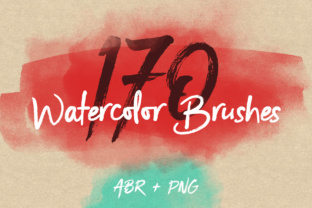
In the digital age, achieving an authentic, handmade aesthetic can be the key to creating a powerful and memorable visual identity. The 170 Watercolor Brushes Pack for Photoshop offers an immediate solution, providing a vast library of digital assets that mimic the delicate textures and organic flow of real watercolor paint. Each element has been carefully drawn on paper and digitized, allowing you to infuse your creative projects with a genuine artistic touch that resonates with audiences seeking authenticity and warmth.
Practical Applications for Modern Designers
This versatile brush set is more than just a collection of digital tools; it's a gateway to enhanced visual communication. Whether you're a seasoned graphic designer, a marketer, or a small business owner, these brushes can transform standard projects into compelling pieces of art. Their application spans a wide range of creative fields, directly impacting brand perception and user engagement.
Consider how these assets can be integrated into your design workflow:
- Brand Identity & Logo Design: Use the brushes to create unique, textured logos or brand marks that stand out in a crowded marketplace. A watercolor effect can convey creativity, elegance, or a handmade quality, strengthening the core of a brand's visual language.
- Marketing & Social Media Graphics: Design eye-catching posters, flyers, and social media posts. The organic textures create visual interest and can improve engagement by breaking the monotony of flat, digital-only graphics. They are perfect for announcements, quotes, or promotional banners.
- Packaging & Print Design: Add a premium, artisanal feel to product packaging, wedding invitations, greeting cards, and stationery. The subtle grain and color variations of watercolor textures can elevate the unboxing experience and make print materials feel more valuable.
- Web & UI Design: Incorporate watercolor elements as background textures, dividers, or accent graphics on websites and apps. When used thoughtfully, they can soften a digital interface, guide the user's eye, and contribute to a more inviting user experience (UX).
- Editorial & Presentation Design: Enhance reports, magazines, or slide decks with artistic accents. A well-placed watercolor wash can frame content, highlight key points, and improve the overall visual hierarchy of a document.
Integrating Texture into Your Design Workflow
To maximize the impact of the 170 Watercolor Brushes Pack for PS, thoughtful application is essential. Start by considering your project's goals and audience. A luxury brand might use subtle, muted washes for sophistication, while a children's product line could benefit from vibrant, playful splashes. Consistency is key; ensure the texture style aligns with your broader color palette and typography to maintain a cohesive brand identity.
Evaluate each brush not just on its beauty, but on its function. Use larger, softer brushes for background washes and smaller, detailed ones for accents or hand-drawn typography elements. Always consider scalability and readability—ensure that adding texture does not compromise the clarity of your message, especially in text-heavy designs. The included ABR file for Adobe Photoshop and the separate PNG files with transparent backgrounds offer flexibility, allowing you to use these assets in your preferred photo editing software and integrate them seamlessly into complex compositions.
Ultimately, the most effective designs balance aesthetic appeal with clear communication. Quality creative assets like this watercolor brush pack serve as building blocks that empower you to achieve that balance more efficiently. By selecting resources that offer both versatility and professional quality, you invest in your ability to produce work that is not only visually stunning but also strategically effective, leaving a lasting impression on your audience.